
Opening a real-money account with PartyPoker is a straightforward process for eligible players in the United Kingdom‚ but registration is only the first step. You will also need to verify your identity‚ meet the site’s age and location requirements‚ and make a payment using an accepted method before you can play for cash. This guide explains the usual activation process‚ what to check if a step fails‚ and how to approach online poker responsibly.
PartyPoker’s website and app may change their menus‚ payment options‚ or verification procedures over time. Follow the instructions displayed in your account and consult the operator’s current terms if they differ from this overview. Never try to bypass identity checks or access restrictions.
Before you create an account
PartyPoker is intended for adults. In the UK‚ you must be at least 18 to gamble‚ and you must be physically located in a jurisdiction where the service is available when you play. The operator may ask for evidence of your age‚ identity‚ address‚ or payment method. Have accurate personal details ready‚ and use your own payment account rather than someone else’s.
Check that you have reached the genuine PartyPoker site or downloaded its official app. Avoid links in unsolicited messages and advertisements that promise guaranteed profits‚ exclusive access‚ or unusually large bonuses. A real-money poker account is not a source of guaranteed income: poker outcomes involve risk‚ and even skilled players can lose.
Registration and account activation
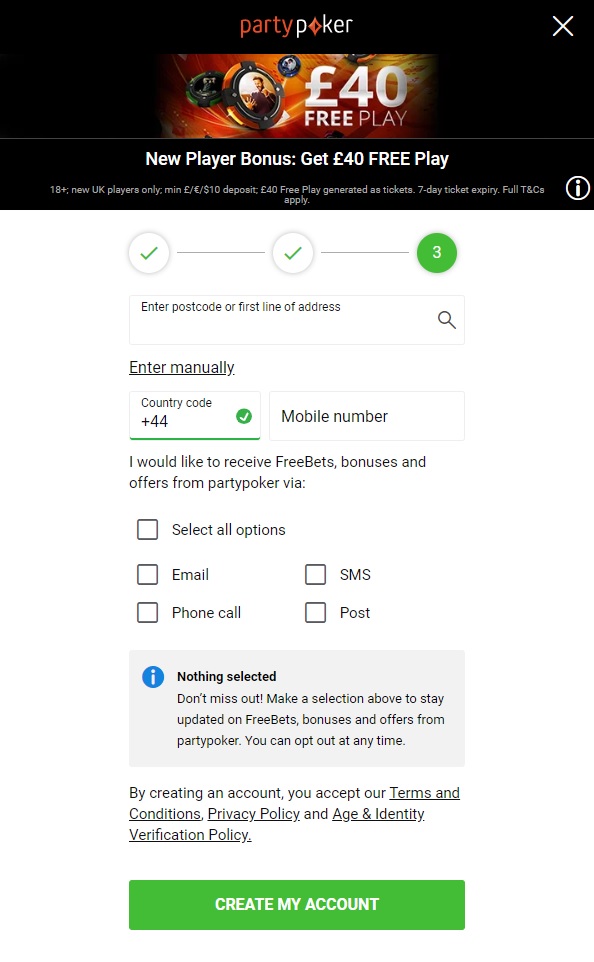
Start the sign-up process
Choose the registration option on the official site or app. You will generally be asked for personal information such as your name‚ date of birth‚ address‚ email address‚ and mobile number. Enter your details exactly as they appear on your identification and other documents. Incorrect or inconsistent information can delay verification or prevent a withdrawal later.
Create a strong‚ unique password and keep it private. If the service offers additional account-security measures‚ consider enabling them. Do not share login details with friends‚ and do not allow another person to use your account. Online gambling accounts are personal‚ and account sharing can breach the operator’s rules.
Confirm your contact details
PartyPoker may ask you to confirm your email address‚ mobile number‚ or both. Check your inbox‚ including spam and junk folders‚ for a verification message. Use the confirmation link or code promptly‚ and request a fresh one if it has expired. If a message does not arrive‚ verify that you entered the correct contact details before contacting support.
Complete identity and age checks
Operators licensed in Great Britain must take steps to confirm that customers are old enough to gamble and that their accounts meet applicable legal and regulatory requirements. Some checks may be completed electronically. If the operator cannot verify your details automatically‚ it may ask you to upload documents through a secure account area.
Commonly requested documents include a passport or driving licence and proof of address‚ such as a recent utility bill or bank statement. The exact requirements can vary. Submit clear‚ unaltered images and make sure that your name and relevant details are visible. Do not send sensitive documents through social media or to an email address that has not been confirmed as an official support channel.
Make a deposit if you are ready to play
Once your account is eligible for real-money play‚ open the cashier or payments section and review the available methods. Options may include debit cards or other payment services‚ but availability can depend on the operator’s current arrangements and your account. Check minimum and maximum deposit amounts‚ processing times‚ and any fees before confirming a transaction.
Set a budget before depositing. Use only money you can afford to lose‚ and do not borrow or use funds intended for essential expenses. A successful deposit does not guarantee that every account feature is immediately available: the operator may still request documents or apply additional checks before allowing certain transactions.
Signing in and getting help
After registration‚ use the sign-in page or app with the email address or username and password associated with your account. If you have trouble‚ first check for typing errors‚ confirm that you are using the correct sign-in method‚ and make sure the app or browser is up to date. Use the password-reset option if needed‚ and avoid repeated guesses that could temporarily lock the account.
For party poker casino sign in help‚ use the official PartyPoker login recovery tools or contact support through the operator’s verified website or app. Explain the problem without sending your password‚ full card details‚ or one-time security codes. Support should not need your password to investigate a login issue.
If you see an unfamiliar transaction‚ suspect someone else has accessed your account‚ or receive a password-reset message you did not request‚ change your password as soon as you can and contact the operator. Ask your payment provider for advice if a transaction appears unauthorised. Keep any relevant confirmation emails or reference numbers.
Common activation problems
- Details do not match: Check spelling‚ date of birth‚ and address formatting against your documents. If you have recently moved‚ follow the account process for updating your address.
- Verification is pending: Review your account messages for a specific request. Processing can take time‚ especially if an image is unclear or information needs manual review.
- A document was rejected: Check that it is current‚ legible‚ complete‚ and an accepted document type. Upload it again only through the secure channel specified by PartyPoker.
- A deposit is declined: Confirm that the payment method is supported‚ the details are correct‚ and your bank has not blocked the transaction. Do not repeatedly retry a payment that you do not recognise.
- You cannot access the site: Check that the service is available in your location and that you are using the official domain or app. Do not use tools or false details to get around location controls.
Questions and answers
Can I play for real money as soon as I register?
Not necessarily. The operator may require contact confirmation‚ identity or age verification‚ and other checks. Follow the account prompts and wait for confirmation that the relevant features are available.
What should I do if verification takes longer than expected?
Check your inbox and account messages for a request or status update. If there is no explanation‚ contact official support with your username or case reference. Do not open duplicate accounts to get around a delay; this can create further verification problems.
Can I use another person’s card or e-wallet?
You should use a payment method belonging to you and permitted by the operator’s terms. A payment in another person’s name may be declined‚ trigger extra checks‚ or create withdrawal difficulties.
What if I have forgotten my password?
Use the official password-reset facility. Follow the instructions sent to your registered contact details‚ choose a new unique password‚ and secure your email account as well. If you no longer have access to the registered email or phone‚ contact support for account-recovery guidance.
Account and payment checks at a glance
| Stage | What to check | Good practice |
|---|---|---|
| Registration | Personal details and eligibility | Use accurate information and your own account |
| Verification | Age‚ identity‚ and address requests | Upload clear documents through the secure account area |
| Deposit | Accepted methods‚ limits‚ and processing | Set a budget and check the amount before confirming |
| Sign-in | Correct credentials and official access point | Use a unique password and never share security codes |
Play within your limits
Activation makes real-money poker available; it does not make gambling risk-free. Before playing‚ review the rules of the poker format you choose‚ including blinds‚ buy-ins‚ tournament fees‚ and table limits. Start with stakes that fit your budget‚ and do not increase them to recover losses. Poker involves decisions and uncertainty‚ so no strategy can assure a win.
Take breaks and keep gambling separate from work‚ relationships‚ and essential spending. If play stops feeling enjoyable or you find it difficult to stick to limits‚ use the account’s safer-gambling tools‚ such as deposit limits‚ time-outs‚ or self-exclusion where available. In Great Britain‚ you can also seek confidential support from organisations such as GamCare. If you are concerned about your gambling‚ pause play and reach out for help rather than trying to solve the problem with another deposit.
In short‚ activating a PartyPoker real-money account in the UK means registering with accurate details‚ confirming your contact information‚ completing any required checks‚ and choosing an eligible payment method. Use official support for account problems‚ protect your login credentials‚ and only play with money you can afford to lose.